Configuring Identity and Access Management (IAM)
This section describes how to configure IAM system settings in the Live Platform when you want to implement IAM-based user authentication and management.
Once you've completed configuring IAM, you can use the following buttons located at the bottom of the page to perform various functionality:
| ■ | IAM Entities Synchronization: Synchronizes IAM entities' accounts with Live Platform entities, creating new accounts in IAM for Live Platform entities that haven't IAM accounts. |
If synchronization fails to create an IAM account for a specific Live Platform entity, you can manually create a IAM account, as described in Create Identity and Access Management (IAM) Account.
| ■ | Test IAM Connectivity: Tests connectivity with the IAM server, using the configured credentials (client ID and secret). |
| ➢ | To configure IAM: |
| 1. | Open the Authentication page (System > Administration > Security > Authentication), and then select the IAM tab. |
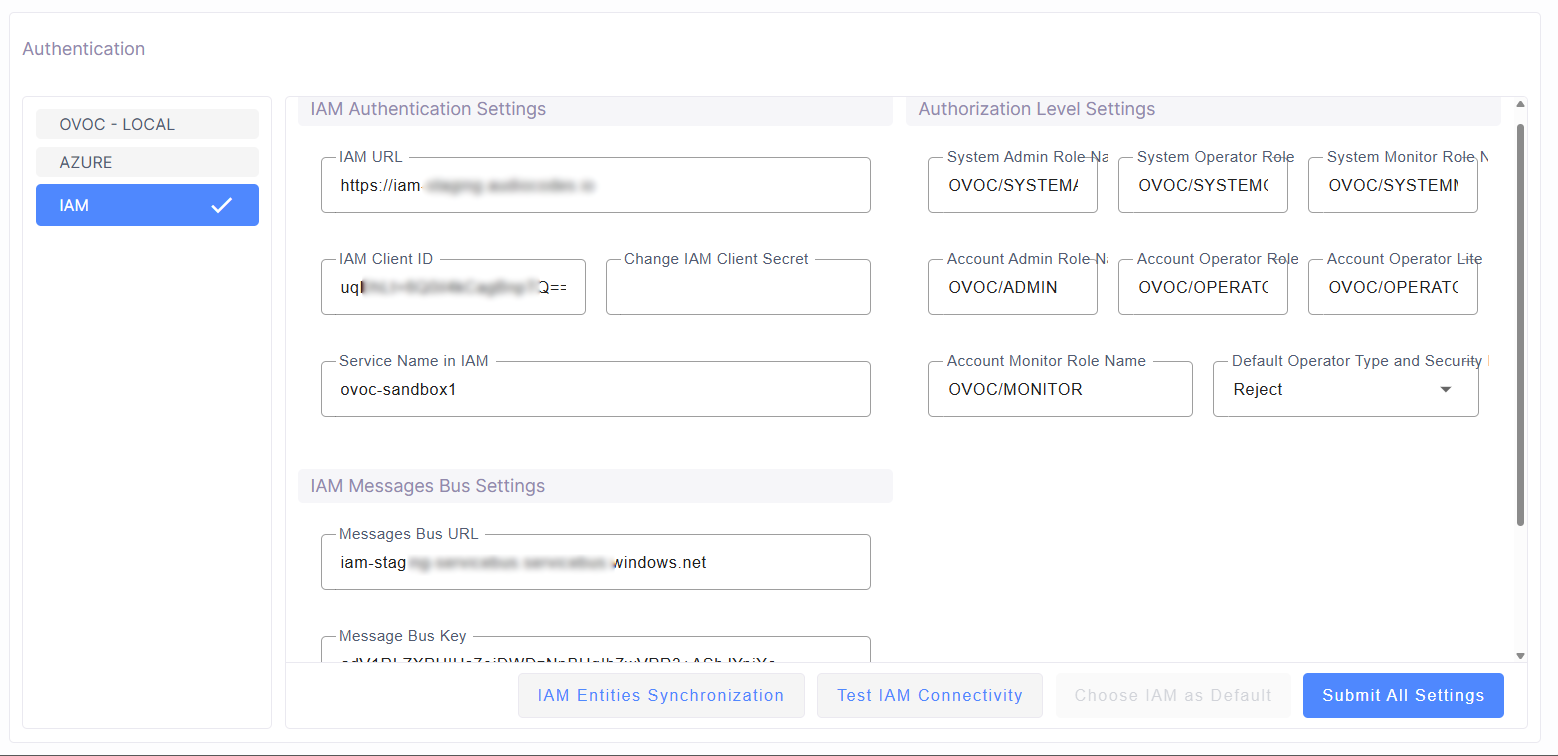
| 2. | Configure the fields, as described in the following table: |
|
Parameter |
Description |
|||||||||||||||||||||
|---|---|---|---|---|---|---|---|---|---|---|---|---|---|---|---|---|---|---|---|---|---|---|
|
IAM Authentication Settings |
||||||||||||||||||||||
|
IAM URL |
Defines the URL of the IAM system. |
|||||||||||||||||||||
|
IAM Client ID |
Defines the client ID for authentication with the IAM system. |
|||||||||||||||||||||
|
Change IAM Client Secret |
Defines the client secret (password) for authentication with the IAM system. |
|||||||||||||||||||||
|
Service Name in IAM |
Defines the unique name of the Live Platform service in the IAM system. |
|||||||||||||||||||||
|
IAM Messages Bus Settings Note: The values of the below parameters are based on the connection string that is sent to you: Endpoint=sb://iam-staging-servicebus.servicebus.windows.net/;SharedAccessKeyName=OVOC-QA;SharedAccessKey=xV9eBpJtK1ToiW..........Fv+ASbJ+BY78=;EntityPath=iam_ovoc-qa Configure the parameters with the values obtained as follows from the string (bold above):
|
||||||||||||||||||||||
|
Messages Bus URL |
Defines the URL of the message bus. When IAM sends an email to a user (for example, to verify email address), it actually sends the email to this URL. All relevant system administrators that have access to this URL can view (retrieve) relevant messages and then send the email to the user. |
|||||||||||||||||||||
|
Message Bus Key |
Defines the shared access key (policy). |
|||||||||||||||||||||
|
Messages Bus Key Name |
Defines the shared access key name. |
|||||||||||||||||||||
|
Authorization Level Settings |
||||||||||||||||||||||
|
System Admin Role Name |
Defines the name of the role for System Admins. |
|||||||||||||||||||||
|
System Operator Role Name |
Defines the name of the role for System Operators. |
|||||||||||||||||||||
|
System Monitor Role Name |
Defines the name of the role for System Monitors. |
|||||||||||||||||||||
|
Account Admin Role Name |
Defines the name of the role for account Admins. |
|||||||||||||||||||||
|
Account Operator Role Name |
Defines the name of the role for account Operators. |
|||||||||||||||||||||
|
Account Operator Lite Role Name |
Defines the name of the role for account Operator Lite. |
|||||||||||||||||||||
|
Account Monitor Role Name |
Defines the name of the role for account Monitors. |
|||||||||||||||||||||
|
Default Operator Type and Security |
Defines the default operator type and level when no operator type or security level is configured in AIM:
|
|||||||||||||||||||||
| 3. | Click Submit All Settings. |